
What Time Will It Be in 17 Hours?
Calendar
Same span, other units
The time in 17 hours is your current time plus 17 hours, and the live widget above this article does that sum on your own clock and time zone. By hand, the fastest route is to add 24 hours and take away 7: the clock reads the same as it did 7 hours ago, but on the next day.
That makes 17 hours an awkward interval. It is long enough to cross midnight in most cases, short enough to stay inside a single day’s planning, and it rarely matches a round clock figure, so mistakes are easy to make.
The shortcut: add 24, subtract 7
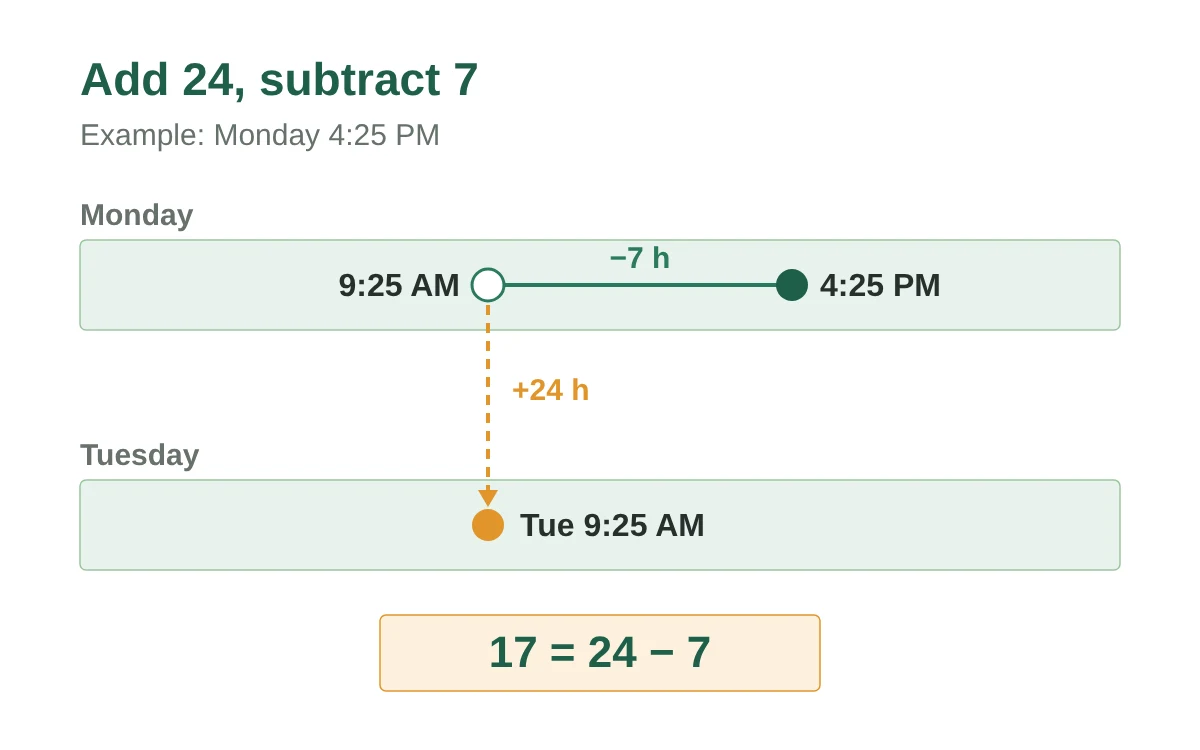
Adding 17 directly means crossing 12 or 24 on the dial, and that is where people slip. Going the other way is easier because 17 is 7 short of a full day. Take the current time, subtract 7 hours, and move to tomorrow’s date.
For a 12-hour clock there is a second route: add 12 (which just swaps AM and PM and moves you half a day on), then add 5 more. Both routes give the same answer. Pick whichever feels easier with your start time, and never touch the minutes.
On a 24-hour clock the method is plain arithmetic: add 17 to the hour, and if the total is 24 or more, subtract 24 and move to the next date. A start of 19:10 gives 36:10, which is 12:10 the next day.
When 17 hours stays on today’s date
The cut-off is 7:00 AM. Any start time from midnight up to 6:59 AM lands later the same day, because the hour total stays below 24. At exactly 7:00 AM the sum reaches 24 and the result is midnight at the start of tomorrow.
This is a quick sanity check on the widget’s answer. If you load the page at 5:30 AM and the result shows a different date, something is wrong with your device clock or time zone setting. If you want to see how the midnight boundary behaves in general, how long until midnight shows the remaining time to that line.
A worked example
Take a hypothetical start of Monday 20 April at 4:25 PM. Here are the steps:
- Convert to 24-hour time: 16:25.
- Add 17 to the hour: 33:25.
- The total passes 24, so subtract 24: 09:25, and move one date forward.
- Result: Tuesday 21 April at 9:25 AM.
Check it with the shortcut: 4:25 PM minus 7 hours is 9:25 AM, and the date moves to tomorrow. Both methods agree. If you only need the reverse direction, 10 hours ago shows how subtracting works on the same principle.
Try this: Pick the time on your clock right now and work out the answer using the subtract-7 shortcut. Then compare it with the widget. Do it three times at different times of day and the shortcut becomes automatic.
Month ends, year ends and weekdays
Because the result is nearly always on the next date, a start late on the last day of a month rolls into the next month. A hypothetical start of Wednesday 30 September at 10:40 PM gives 39:40, so the result is 3:40 PM on Thursday 1 October. The same applies at year end, and in February the leap year decides whether the result lands on the 29th or on 1 March.
The weekday only moves forward by one when the date does. That matters if you are checking whether a result falls on a weekend. A Friday start at 8:00 AM or later ends on Saturday, which affects anything that depends on business days. For longer jumps in whole days, the date calculator handles month lengths and leap years for you.
Daylight saving can shift the answer
Seventeen hours always lasts 61,200 seconds, but the clock on the wall may not agree with a simple sum. In regions that change clocks, a 17-hour span that crosses the change ends one hour off the sum you calculated by hand.
Take a hypothetical Saturday at 8:00 PM on a night when clocks spring forward. The plain sum gives 1:00 PM on Sunday, but the clock actually shows 2:00 PM, because one hour was skipped. When clocks fall back, the same start shows 12:00 PM, because one hour happened twice. The widget uses your device’s time zone rules, so it handles this correctly, while mental math does not.
Try this: Look up the date of your next clock change. If any start time in the next day falls within 17 hours of it, add a note to check the result against the widget instead of trusting the hand sum.
Time zones and 17 hours
Seventeen hours from now is the same instant everywhere on Earth. Only the label changes. If someone in another zone asks for “17 hours from now”, they get the same moment as you, shown on their own clock.
The common mistake is to apply the time zone offset to the interval itself. You do not add or subtract the offset from the 17 hours. Calculate the result in one zone, then convert that one result by the offset. Writing results in UTC when sharing them across zones removes any doubt. Hour counts work like this in any unit, and the time conversions page covers the usual ones.
Where 17 hours shows up in real plans
Seventeen hours is not a standard interval in most rules, so it usually appears as a remainder: what is left of a 24-hour window, a 72-hour hold, or a deadline. A few places where it matters:
- Deadlines: a “within 24 hours” request sent 7 hours ago has 17 hours left. Count from the timestamp on the message, not from when you read it.
- Medication: doses are usually set by the label or the prescriber. Work from the actual time of the last dose rather than the clock time you meant to take it, and do not use a calculator to override instructions.
- Shipping: carrier estimates often count business hours, so 17 calendar hours over a weekend can be more than 17 hours of actual processing.
- Notice periods: contracts and policies differ on whether notice runs from sending or receipt, and whether weekends count. Check the wording.
For nearby intervals, 16 hours from now is exactly one hour earlier on the clock, and 72 hours from now is the next common checkpoint for holds and returns.
Common mistakes with 17 hours
The most frequent one is adding 17 and forgetting AM and PM flip. Add 17 to 9 PM and you get 26, which is 2 AM, not 2 PM. A second mistake is stopping at 12 on a 24-hour clock. Hours run 0 to 23, so 24 becomes 0.
Another is counting 17 hours “from tonight” when your start is the moment you read the message, not when you plan to begin. Use the real timestamp. For more intervals and countdowns, the hours and days from now hub lists them all.
Frequently asked questions
What time will it be in 17 hours?
The live widget above the article shows the exact answer on your own clock. By hand, add 17 to the hour and subtract 24 if the total passes 24, which means the answer falls on tomorrow's date.
How many minutes and seconds are in 17 hours?
17 hours is 1,020 minutes or 61,200 seconds. Minutes never change the method, so a start time of 3:40 PM ends in :40 as well.
Will 17 hours from now be tomorrow?
Usually yes. It lands on the same date only if your clock currently reads before 7:00 AM. From 7:00 AM onward, the result is on the next calendar day.
Does daylight saving time change what time it is in 17 hours?
It can. If clocks change during the 17 hours, the elapsed time is still 17 hours but the clock face moves one hour forward or back from the simple sum. Check the result in your local time zone.